# 追加コンテンツ

## 追加コンテンツ <a href="#additional-contents" id="additional-contents"></a>

### 基本設定 <a href="#basic" id="basic"></a>

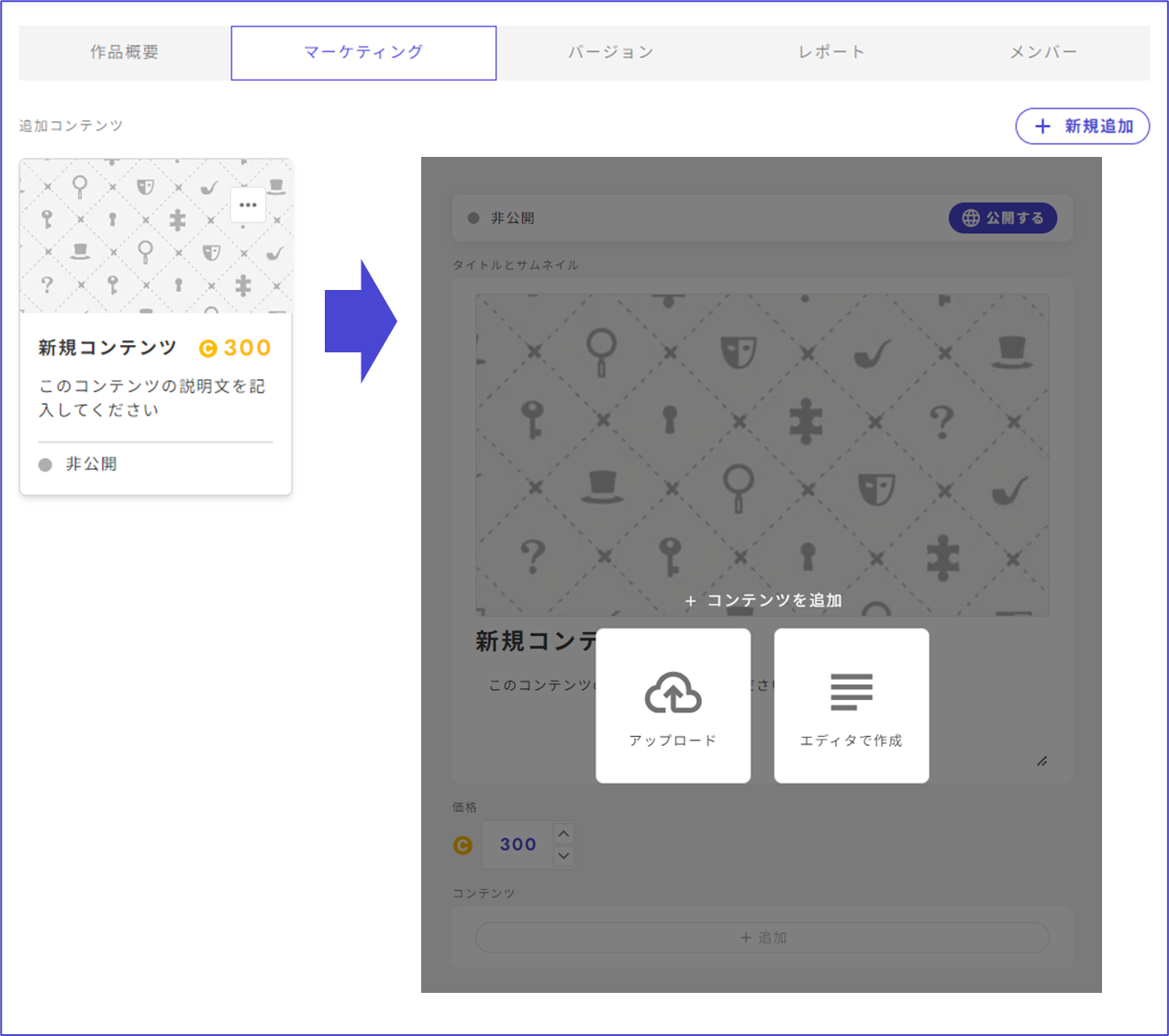
後日談や制作秘話など、プレイヤーがシナリオプレイ後に購入するコンテンツを作成することができます。

プレイ前に自分で「未プレイ」ボタンを「プレイ済み」に変えると事前に閲覧もできるため、GM資料の配布にも適しています。

<figure><img src="https://1279302283-files.gitbook.io/~/files/v0/b/gitbook-x-prod.appspot.com/o/spaces%2FgOyErfAjeKrNXFgLBxtx%2Fuploads%2Fgit-blob-af3fac12006eb60f00875fe7b593064eeecaf506%2Fimage.png?alt=media" alt=""><figcaption></figcaption></figure>

**トップ画像（横長16:9）**\
デフォルト画像のままの販売はNGです。ご自身で作成した画像をアップロードしてください。

**値段**\
追加コンテンツの値段の下限は0コイン、上限はありません。

**説明文**\
アプリ上では100文字まで表示されます。

**コンテンツ**\
アップロードできるコンテンツの種類は以下の通りです。

* 画像(png/jpg形式)
* 動画(mp4形式)
* 音声(mp3形式)
* pdf
* ウズスタジオ内で作成できるテキストエディタ

**審査**\
追加コンテンツは無料・有料に限らず運営による審査はございません。

### 規約への同意 <a href="#agreement" id="agreement"></a>

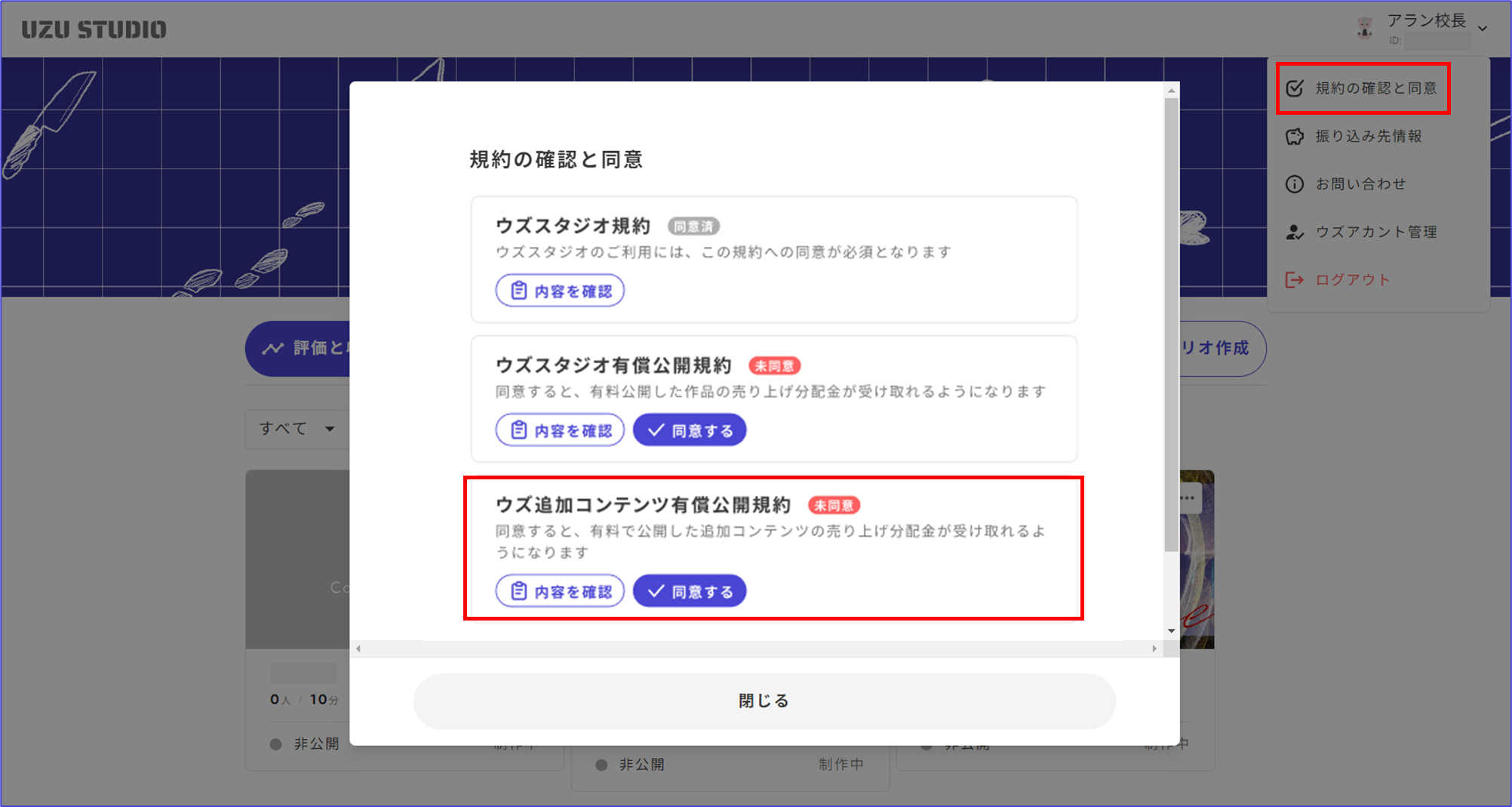
有料で公開する際は「ウズ追加コンテンツ有償公開規約」をご一読ください。売り上げを受け取る人全員が規約に同意していなければ公開できません。

<figure><img src="https://1279302283-files.gitbook.io/~/files/v0/b/gitbook-x-prod.appspot.com/o/spaces%2FgOyErfAjeKrNXFgLBxtx%2Fuploads%2Fgit-blob-8f01f01f9160bab8fd27461186b81fcf209c328e%2Fimage.png?alt=media" alt=""><figcaption></figcaption></figure>

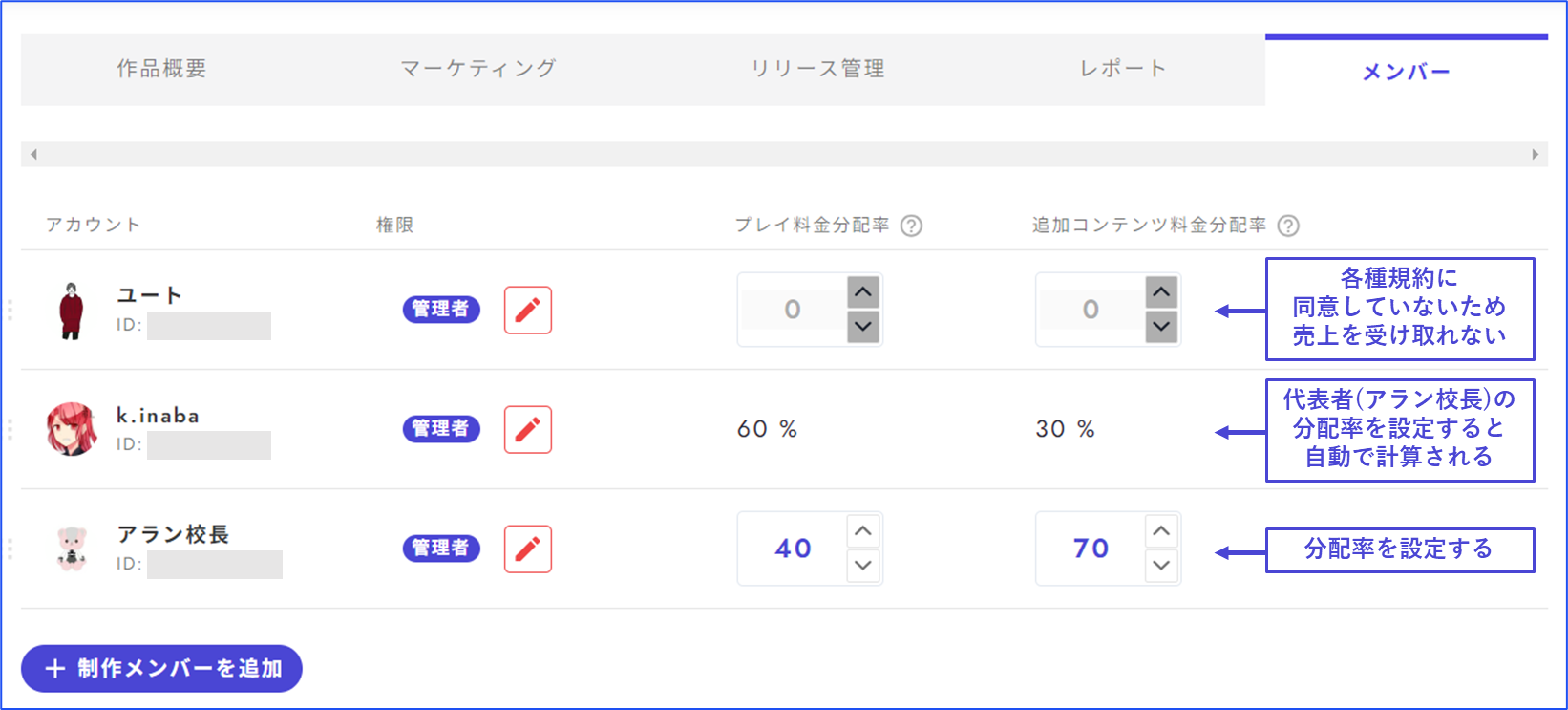
共作の場合の売り上げの分配設定は「メンバー」画面から行います。

追加コンテンツの種類ごとに分配率を設定することはできず、全て一括での分配率設定になります。

<figure><img src="https://1279302283-files.gitbook.io/~/files/v0/b/gitbook-x-prod.appspot.com/o/spaces%2FgOyErfAjeKrNXFgLBxtx%2Fuploads%2Fgit-blob-9c3b58d7dc7b5905c9459cc87636e0482d781332%2Fimage.png?alt=media" alt=""><figcaption></figcaption></figure>

### アプリ内での表示 <a href="#display" id="display"></a>

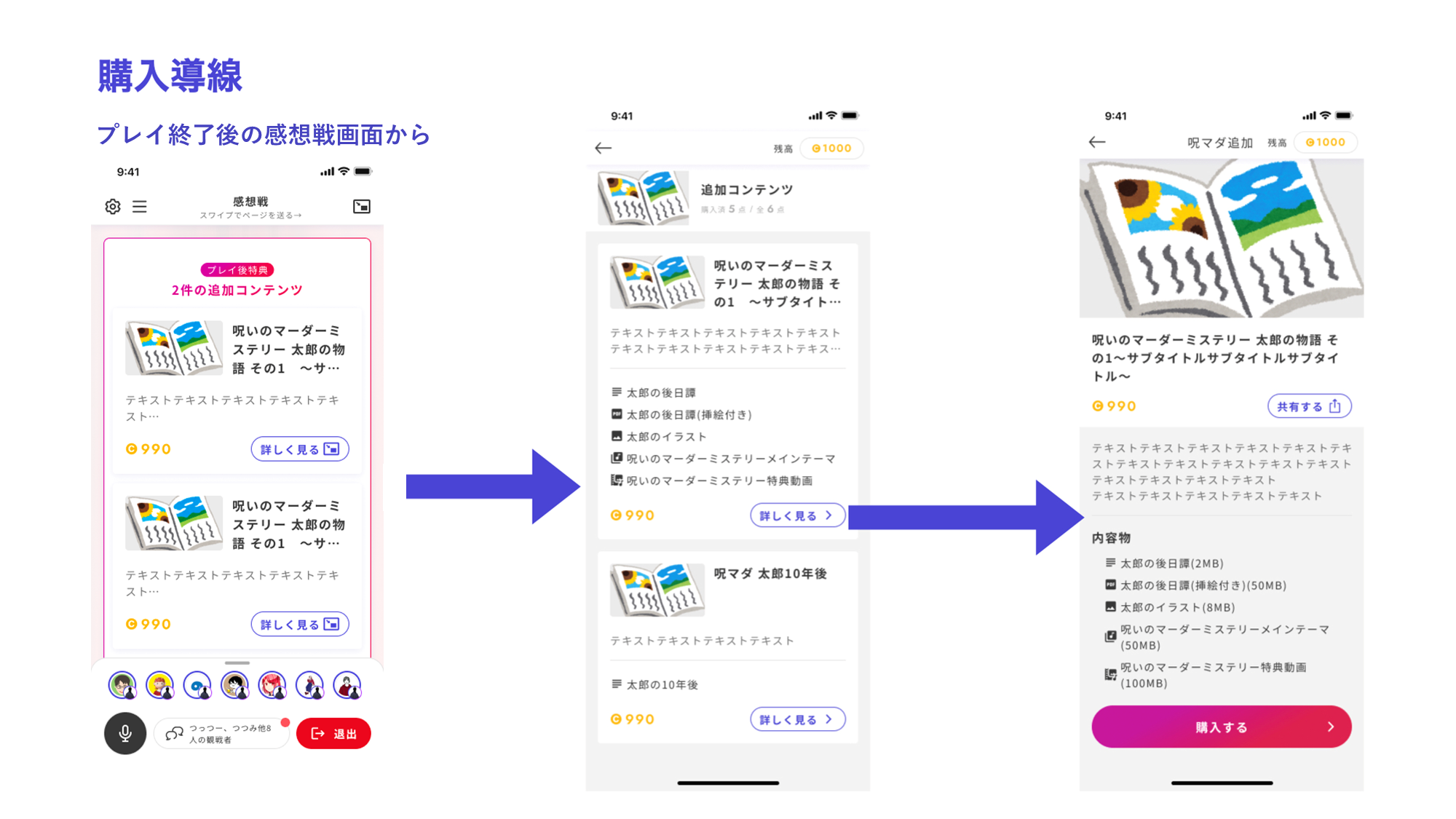
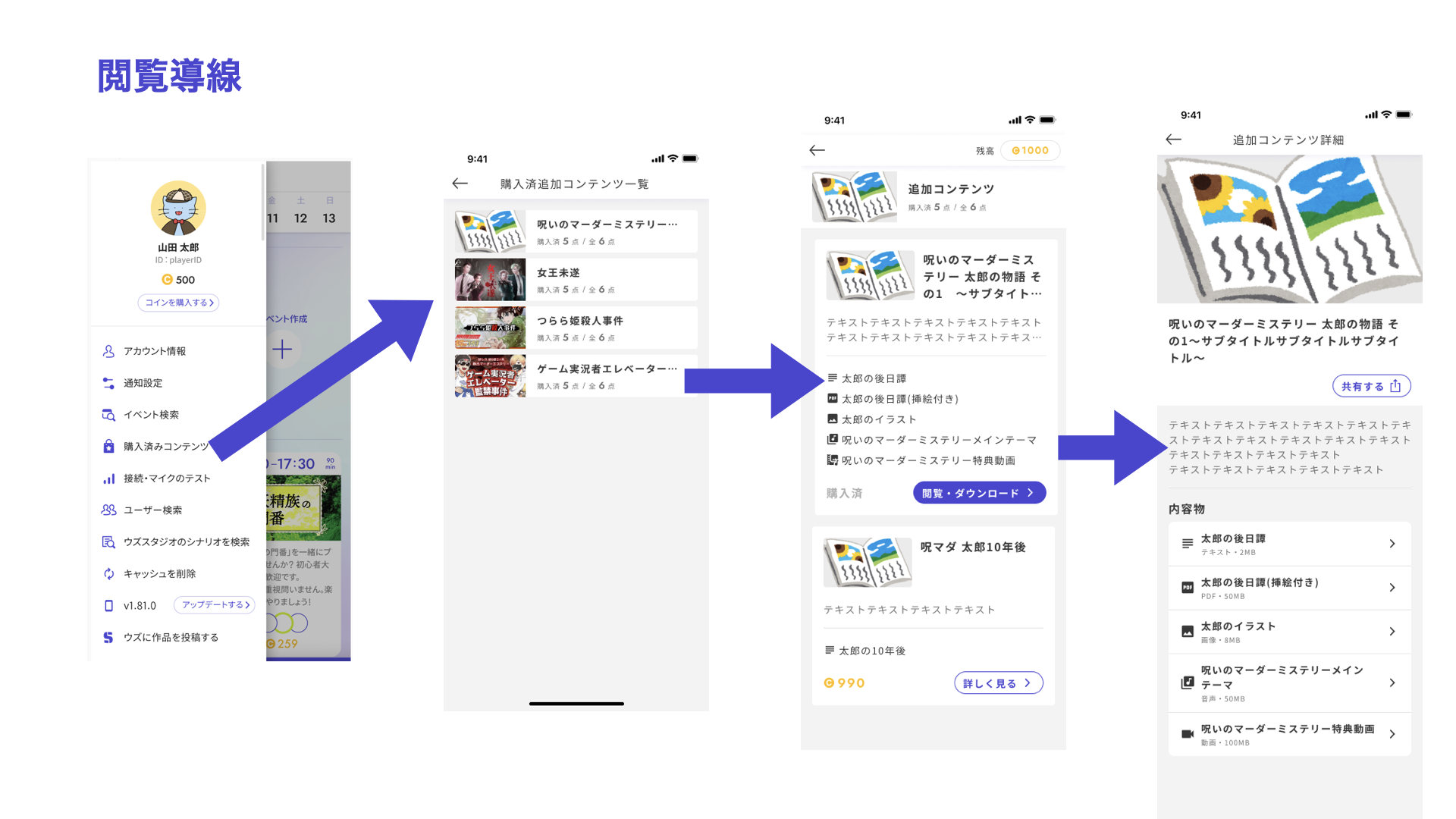
追加コンテンツのアプリ側での見え方は以下のようになります。v3.50.0以上にアップデートしている端末で確認できます。
<figure><img src="https://1279302283-files.gitbook.io/~/files/v0/b/gitbook-x-prod.appspot.com/o/spaces%2FgOyErfAjeKrNXFgLBxtx%2Fuploads%2Fgit-blob-2b6e999471c19ba0c8a9cee816e8521643ff8d70%2Fimage.png?alt=media" alt=""><figcaption></figcaption></figure>

<figure><img src="https://1279302283-files.gitbook.io/~/files/v0/b/gitbook-x-prod.appspot.com/o/spaces%2FgOyErfAjeKrNXFgLBxtx%2Fuploads%2Fgit-blob-f2f5959d47ec96889f8081b538a10b0c102dbf24%2Fimage%20(74).png?alt=media" alt=""><figcaption></figcaption></figure>

<figure><img src="https://1279302283-files.gitbook.io/~/files/v0/b/gitbook-x-prod.appspot.com/o/spaces%2FgOyErfAjeKrNXFgLBxtx%2Fuploads%2Fgit-blob-a2056c463d8ca54ac3b22f5be9848714da2bc1c7%2Fimage.png?alt=media" alt=""><figcaption></figcaption></figure>


---

# Agent Instructions: Querying This Documentation

If you need additional information that is not directly available in this page, you can query the documentation dynamically by asking a question.

Perform an HTTP GET request on the current page URL with the `ask` query parameter:

```
GET https://docs.studio.uzu-app.com/scenariohome/marketing/additional-contents.md?ask=<question>
```

The question should be specific, self-contained, and written in natural language.
The response will contain a direct answer to the question and relevant excerpts and sources from the documentation.

Use this mechanism when the answer is not explicitly present in the current page, you need clarification or additional context, or you want to retrieve related documentation sections.